Premium TradingView indicators · Stocks · Futures · Forex · Crypto

Your Charts,Prepped before the bell.

Professional TradingView indicators that leave your charts prepped before the bell.

Auto-drawn pre-market, previous-day, and opening-range levels

Live A+ Trade Checklist, smart alerts, and market internals.

Find what's in play, and trade only the setups that meet your rules.

5.0 on Whop · 21 reviews · Cancel anytime

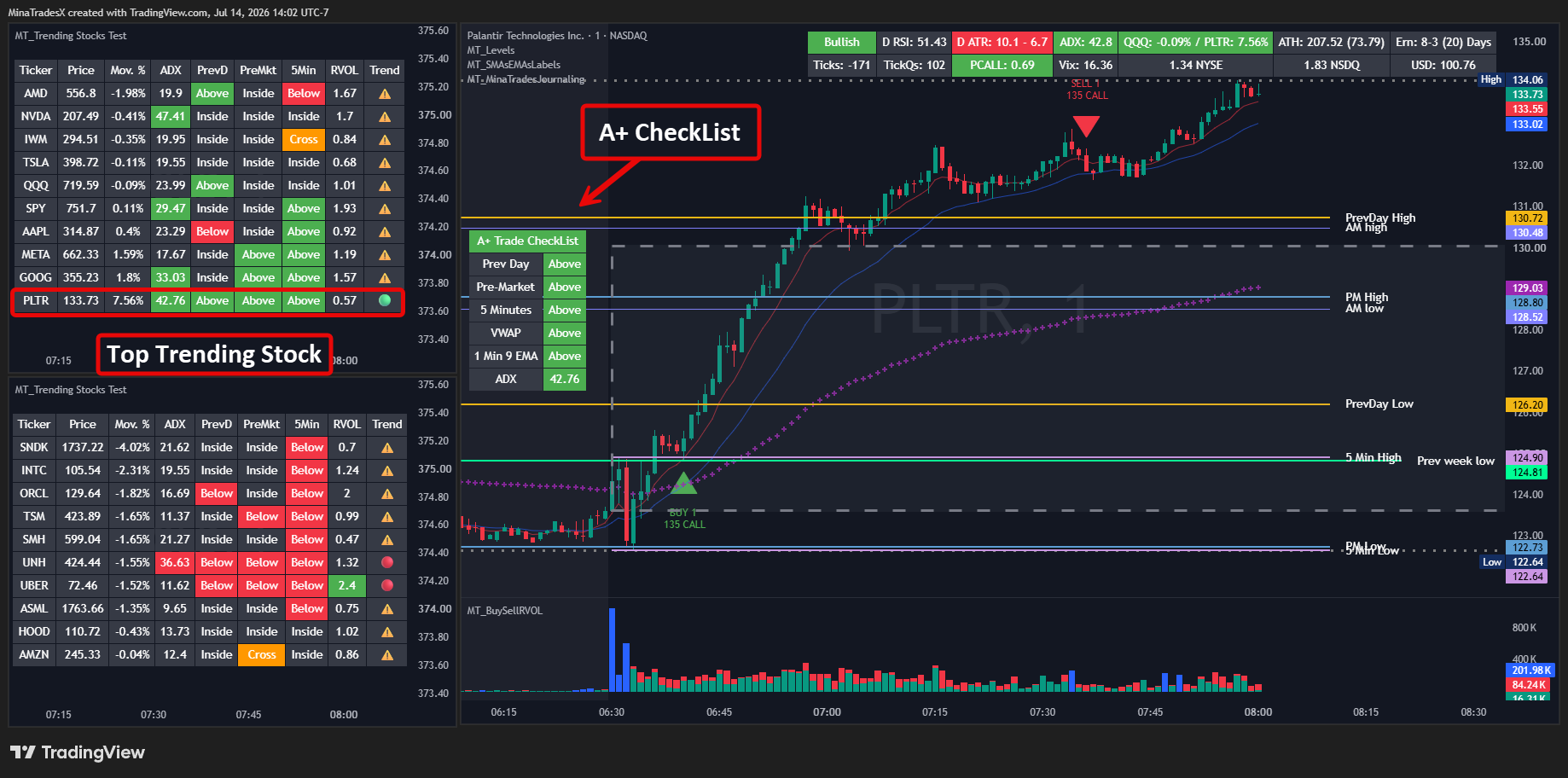
MinaTrades TradingView indicators on a chart — pre-market levels, VWAP, and opening range

5.0 rated on Whop· 21 reviews

The bread and butter

Find what's in play. Trade only A+.

In-play stocks move with volume and direction. Everything else is chop. These two tools are how MinaTrades members find the movers — and stay out of everything else.

01Find the movers

Never trade a choppy stock again.

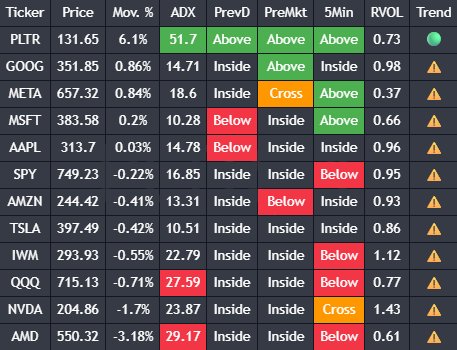
MT_Trending Stocks turns your watchlist into a live strength table. When QQQ trends up, the strongest stocks rise to the top; when it trends down, the weakest do — so the best candidates for the day's direction are always first.

  • Feed it your favorite tickers; it surfaces the ones actually moving.
  • Relative strength and weakness at a glance — trade with the market, not against it.
  • One alert covers your entire watchlist: ADX, Move %, RVOL, level breaks, trend flips.
MT_Trending Stocks screener — watchlist sorted by strength

02Confirm it's your trade

Your trading plan, enforced on-chart.

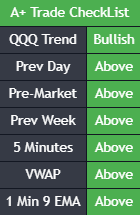
Pick the levels that define an A+ setup for you — prev day, pre-market, prev week, the 5-minute range, VWAP, your moving average, ADX, RVOL. The checklist table turns green as conditions line up and can alert you when everything aligns, bullish or bearish. No more talking yourself into B-grade trades.

  • One glance tells you if the setup meets your criteria.
  • Bullish A+ and Bearish A+ alerts when every condition aligns.
  • Quiet periods around the open and close, so alerts skip the chop.
A+ Trade Checklist — bullish and bearish conditions on-chart

Two tables. One workflow: the screener tells you what's in play; the checklist tells you if it's your trade. That's how you put the odds in your favor.

Getting started

Up and running in minutes.

01

Join on Whop

Pick monthly, yearly, or lifetime. Every plan includes all 9 indicators.

02

Claim with your TradingView username

Access is granted to your account in minutes — a step-by-step guide is included.

03

Add from “Invite-only scripts” and trade

Every indicator comes with a PDF guide and free updates.

The suite

Nine tools. One suite.

Built by an active day trader so your charts are prepped before the bell. Every indicator ships with a step-by-step guide, alerts, and free updates.

PM HIGHPM LOWPD HIGHPD LOW

MT_Levels

Flagship

Day Trader Levels

Every level that matters for the trading day — drawn automatically, with a live A+ Trade Checklist.

  • Stop drawing the same lines every morning — open the chart and they're there.
  • One glance at the checklist tells you if the setup meets your criteria.
  • Get alerted when price breaks a level — not during the open-bell chop.

Included in all plans
MT_Trending Stocks

Flagship

Trending Stocks Screener

Never trade a choppy stock again — a live watchlist table that sorts your tickers by strength and flags the real movers.

  • Feed it your favorite tickers; it surfaces the ones actually moving.
  • Relative strength or weakness at a glance — trade with the market, not against it.
  • One alert covers your entire watchlist.

Included in all plans

BUY VOLSELL VOLRVOL ≥ 2.0×

MT_BuySellRVOL

Buy/Sell Volume with RVOL & Price Alerts

See who's in control of every candle — buying vs selling pressure, with relative-volume bars that flag breakout fuel.

  • Volume confirms the move — see unusual volume the moment it prints.
  • Set a breakout price and get pinged only when it breaks with volume behind it.
  • Configurable alert session, so signals stay inside your trading hours.

Included in all plans

MT_SMAsEMAs

SMA/EMA/VWAP + Market Breadth Table

Ten moving averages from any timeframe, VWAP, and a full market-internals dashboard — on one chart.

  • Replace 4–5 separate indicators and a second monitor of internals with one table.
  • Know instantly whether the market supports your trade, not just the chart.
  • See the Daily 200 SMA while on the 2-minute chart.

Included in all plans

MON HMON LTHU HTHU L

MT_RecentDaysHL

Recent Days High/Low

The last 10 days' highs and lows on your intraday chart — the liquidity levels everyone else is watching.

  • Levels = liquidity. Entries, stops, and targets practically map themselves.
  • Watch how price respects prior-day levels — then trade the reaction, not the guess.
  • Stacks on top of MT_Levels with zero clutter.

Included in all plans

ASIALONDONNYPD HPD LES · London & Asia sessions

MT_FuturesLevels

Futures Levels (ES/NQ & more)

The Levels suite rebuilt for futures — with London and Asia session highs/lows and an A+ checklist that follows ES/NQ.

  • London (02:00–11:00) and Asia (19:00–04:00) session levels, auto-drawn.
  • Opening Range Break with a configurable session.
  • A+ checklist trend from SPY, QQQ, ES, or NQ.

Included in all plans

ASIALONDONNYPD HPD LEURUSD · session levels

MT_ForexLevels

Forex Levels

Session-based levels for FX pairs — pre-market, opening range, 5-minute range, and previous day, all configurable to your sessions.

  • Levels tuned to the sessions you trade.
  • Opening range and 5-minute range for every pair.
  • Same customization depth as the flagship Levels suite.

Included in all plans

00:00 UTCPD HPD LBTC · 24/7 session structure

MT_CryptoLevels

Crypto Levels

24/7 markets still respect levels — auto-drawn session highs/lows, opening range, and prev-day levels tuned for crypto.

  • Session structure for a market that never closes.
  • Prev-day and opening-range levels tuned for crypto volatility.
  • Works across exchanges and pairs on TradingView.

Included in all plans

BUY 100SELL 100

MT_Plot Trades

Plot Trades to Chart + Free Trading Journal

See your real entries and exits on the same chart you traded from — the fastest way to review and improve.

  • Journaling you'll actually do — because it lives where you already work.
  • Spot the pattern: were your losers all fighting the levels?
  • Free companion app at TradeJournaling.com.

Included in all plans

Journaling is your edge

See your trades on your own charts.

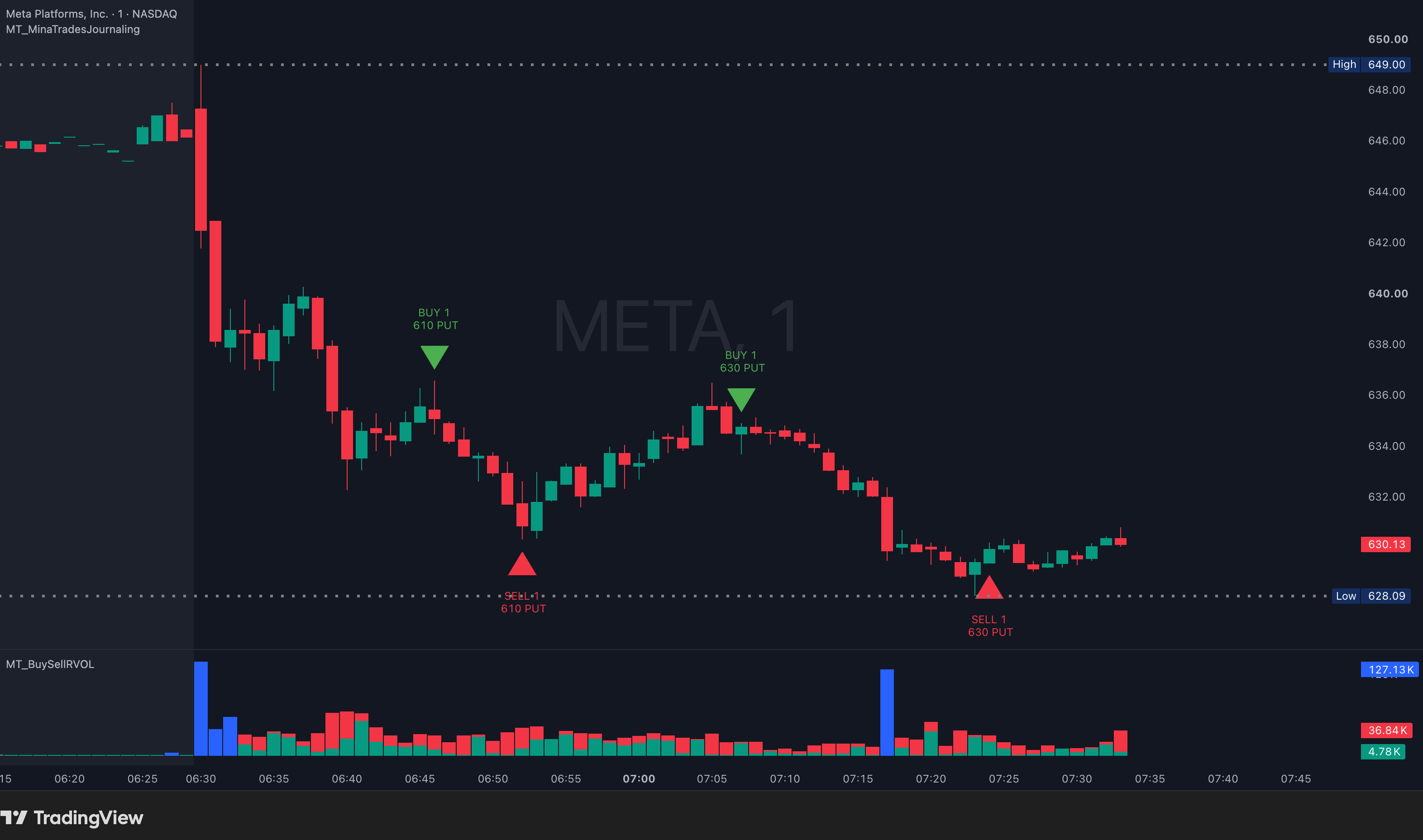
Upload your broker's trade export to TradeJournaling.com and the Plot Trades indicator marks every entry and exit right on the TradingView chart — next to the levels and indicators you traded with.

Journal Your Journey, Learn from Every Trade.

  • Interactive Brokers
  • Fidelity
  • Schwab / ThinkOrSwim
  • Webull
  • TastyTrade
Open TradeJournaling.com →
Plot Trades indicator on a META chart — buy and sell markers from a broker export
Membership

One membership. All 9 indicators. All future ones too.

Monthly

$19.99 /month

Try it out

Start now

Best value

Yearly

$199.99 /year

2 months free vs monthly

Best value

Lifetime

$999 once

All current & future indicators, forever

Never pay again

All plans include: all 9 indicators, the free journal app, PDF guides, updates, and support.

Cancel anytime on Whop. Access is tied to your TradingView username.

Questions

Frequently asked questions

How do I get access after purchase?

On Whop, open the community → Integrations, click each indicator, enter your TradingView username, and hit “Claim Indicators.” Repeat for all of them. Access is granted to that username.

How do I add the indicators to my chart?

In TradingView: Indicators → Invite-only scripts → click the MT_ indicator. They'll stay in your list afterward.

Do I need a paid TradingView plan?

The indicators work on TradingView's plans; a few features scale with plan limits (e.g., Trending Stocks tracks up to 13 tickers on Premium with ADX on, 15 on Pro plans).

Which markets are covered?

US stocks/ETFs (MT_Levels, Trending Stocks, RVOL, SMA/EMA, Recent Days), futures incl. ES/NQ with London & Asia sessions, forex, and crypto.

How do updates work?

A purple refresh icon appears next to the indicator name on your chart when a new version ships — click “Update to latest version.” Changelog is posted on Whop.

How do alerts work?

Every indicator ships with alert conditions (level breaks, RVOL, ADX, A+ setups). You create the alert once in TradingView; frequency and quiet periods (e.g., skip 9:30–9:35) are configurable. Tip: if you change indicator settings, delete and recreate the alert so it picks up the new values.

The level lines look squeezed — how do I fix it?

In TradingView chart settings (gear icon, bottom right), enable “Scale price chart only.” Also use Visual Order → Bring to Front so lines draw above other studies.

Which brokers does the trade journal support?

Interactive Brokers, Fidelity, Schwab/ThinkOrSwim, Webull, and TastyTrade — via CSV upload at TradeJournaling.com (free account).

Is this financial advice?

No. These are charting tools for education and information only. You are responsible for your own trading decisions. Past performance does not guarantee future results, and trading involves significant risk of loss.

How do I get help?

Email support@minatrades.com or post in the Whop community.

Free access

The Disciplined Trader system

Build consistency with a daily report card — pre-market checklist, post-session wins and improvements, and session notes. Customize your checklist, review discipline over any date range, and export to PDF. Free with a TradeJournaling.com account.

  • Daily report card with pre-market & post-market checklists
  • Custom items, reorder, and session-notes templates
  • Discipline summary stats and PDF export
Get free access →

Free account. No credit card required.

Ready to trade with structure?

Join 100% five-star-rated MinaTrades and get all 9 indicators today.

Get all 9 indicators →